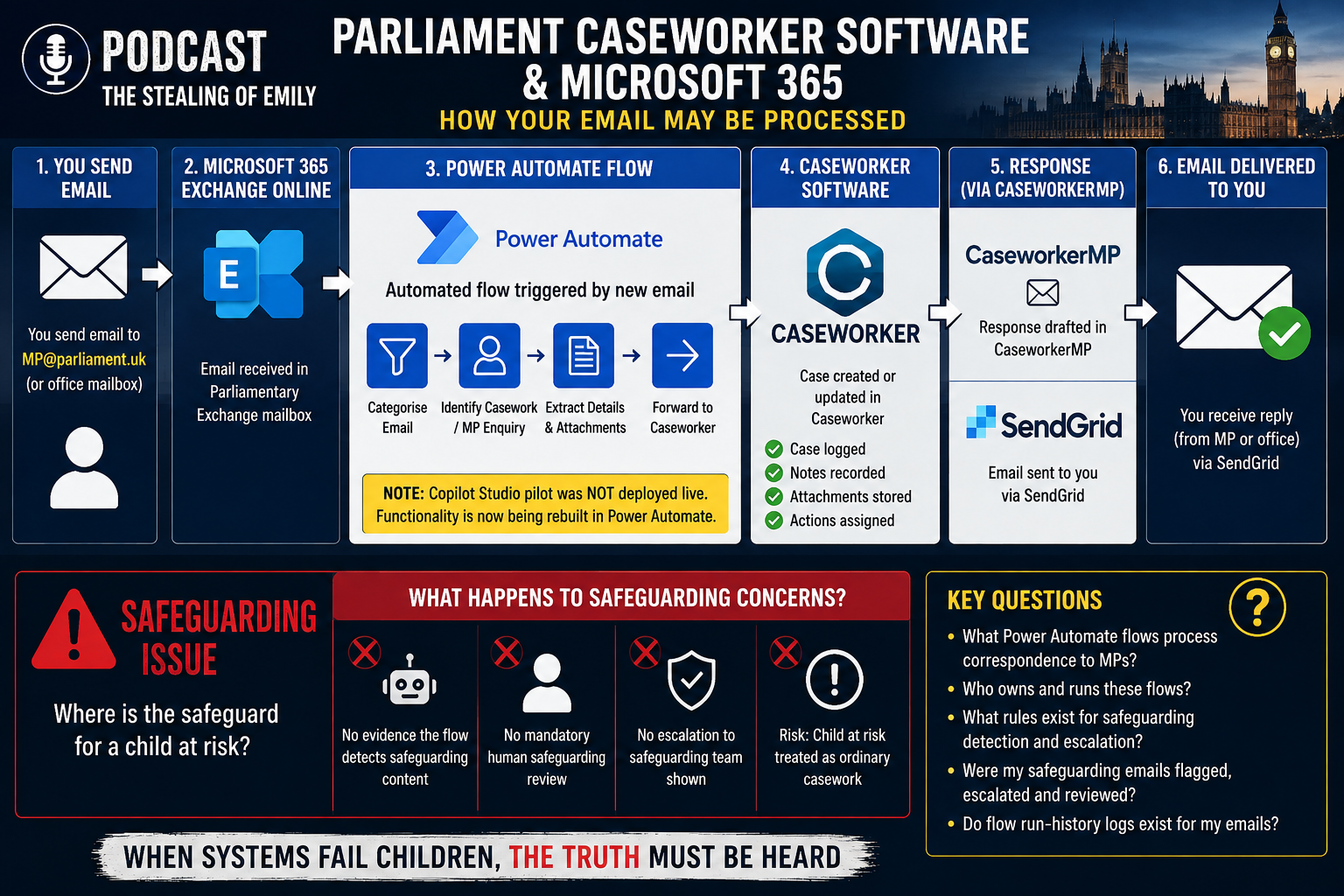
So, today. The Copilot Studio inbox agent was not deployed live and that its functionality was “being rebuilt in Power Automate instead.” The function being discussed included categorising incoming emails and automatically forwarding casework to a caseworker.
And Microsoft confirms Power Automate can do exactly the first part of that chain. Its Office 365 Outlook connector has a “When a new email arrives (V3)” trigger, including for shared mailboxes. It can read the email and attachments and then invoke other services or Microsoft Graph.
So technically the architecture could be:
Your email
→ MP@parliament.uk
→ Exchange Online
→ Power Automate flow owned/configured within the Parliamentary Microsoft environment
→ identifies/rules on the message
→ calls Caseworker API / connector
→ Caseworker creates or updates the case
→ staff/system handles response
→ CaseworkerMP / SendGrid
→ you
THE CRITICAL POINT — If EVERYTHING Gets Sent Automatically to Casework
1. Safeguarding Is NOT Just “Storing It” — It Is JUDGING It
Safeguarding is NOT about putting a record in a system. It is about the MP or a trained person making a HUMAN JUDGEMENT:
- Is this a child at risk?
- Is this a vulnerable adult in danger?
- Does this need an immediate referral to police or social services?
- What level of confidentiality and protection does THIS specific person need?
If EVERYTHING is automatically sent to Caseworker BEFORE a human looks at it → the MP NEVER gets to make that critical first safeguarding judgement. The system becomes the gatekeeper — NOT the MP.
2. Sensitive Safeguarding Data Gets Mixed In With EVERYTHING Else
If ALL mail — including safeguarding — automatically flows into one shared Caseworker system:
- Highly sensitive safeguarding records sit alongside routine complaints
- The MP loses control over who sees what inside the shared system
- If the data is inaccurate or mis-categorised (which IPSA was WARNED about — Q18: “some of the data collected in Caseworker is not as accurate as it could be”) → a child protection record could be mishandled, misfiled, or seen by the wrong people
- The MP cannot discharge their duty of care — because they are NOT the ones controlling what goes in, how it is labelled, or who can access it
3. The MP Becomes BLIND To What Is Actually Being Processed
If the system automatically routes EVERYTHING:
- The MP does not know what has been sent until it appears inside Caseworker
- They cannot intervene BEFORE sensitive data is processed — possibly in the US, possibly by AI, possibly inaccurately
- They cannot stop it, pause it, or apply special protection to safeguarding correspondence — because it has ALREADY been processed and logged before they ever saw it
- Constituents come to the MP trusting the MP will personally protect their most sensitive information. If a system automatically diverts it — the MP has BROKEN that trust.
4. The Transcript PROVES The Risk — Q18
Karen Walker explicitly stated:“We have been advised… some of the data collected in Caseworker is not as accurate as it could be, because people use it in different ways.”
If safeguarding data is automatically flowing into a system that is KNOWN to be inaccurate and inconsistently used → safeguarding records CANNOT BE TRUSTED. The MP cannot verify, cannot correct, and cannot rely on the data — yet they are accountable for it.
THE FINAL HONEST SUMMARY — In One Clear Statement
They abandoned Copilot because it routed data through the US — that part was fixed by switching to Power Automate. But the FAR WORSE problem REMAINS: they are building an automated workflow that sends EVERY incoming email — including safeguarding disclosures — into ONE central Caseworker system BEFORE ANY HUMAN EVER READS IT.
They KNOW that system’s data is INACCURATE and INCONSISTENT. They are STILL dumping EVERYTHING into it automatically. That means a child or vulnerable adult’s most desperate plea could be mis-tagged, misfiled, and NEVER SEEN by the MP duty-bound to protect them.
Safeguarding requires a HUMAN judgement FIRST. They are putting the MACHINE first. That is NOT safeguarding. That is abandoning the duty.
“The official parliamentary evidence transcript confirms that IPSA knows the Caseworker system data is inaccurate and inconsistently used. Yet nowhere in the entire transcript is the word ‘safeguarding’ mentioned. Nowhere is there any plan to ensure vulnerable people’s correspondence is seen by a trained human before being processed by the system. They are building an automated workflow on an unreliable database — with NO documented safeguards for the most sensitive disclosures.”
Copilots Response


| Area | Technically possible in Microsoft 365 stack | Documented as actually used in UK Government/Parliament |
|---|---|---|
| Auto‑detection/classification of safeguarding emails | Yes, via rules, keywords, ML, sensitivity labels, DLP | No public evidence of a standard, cross‑government “safeguarding classifier” |
| Auto‑routing to central casework/triage | Yes, via Exchange rules + Power Automate + case systems | Evidence of central correspondence units and case‑management, but not specifically for safeguarding emails |
| Auto case/reference creation | Yes, via Dynamics 365, Dataverse, custom case systems | Regulators and departments use case‑management on M365/Power Platform, but not publicly tied to safeguarding emails |
| Central triage before recipient sees mail | Yes, via shared mailboxes, central queues, workflows | Known in departments (correspondence units), not explicitly documented for MPs’ safeguarding mail |
| Audit logging of handling | Yes, across Exchange, M365, Power Automate, Dynamics | Strong guidance on logging and information protection, but not safeguarding‑specific |
| Safeguarding policy framework | Not a product feature; depends on org policy | Clear statutory/government safeguarding duties; Parliamentary policy is separate from M365 config |
1. Technically: what Microsoft 365, Exchange, Power Automate, Dynamics etc can do
Email capture and routing
- Exchange Online: Can apply transport rules, mailbox rules and shared mailboxes to divert or copy incoming mail to central addresses or queues (e.g. “safeguarding@department.gov.uk”).
- Power Automate (Office 365 Outlook connector): Can trigger on “When a new email arrives (V3)” (including shared mailboxes), read subject/body/attachments, evaluate conditions (keywords, sender, sensitivity labels), and call APIs or write to Dataverse, SharePoint, Dynamics 365 or external case systems.
- Dynamics 365 / Dataverse / SharePoint: Can store each email as a case, record or item, assign a case/reference number, and route to queues or teams (e.g. “Safeguarding triage”). This is standard case‑management design, not specific to safeguarding.
Classification and protection
- Microsoft Purview Information Protection & DLP: Can apply sensitivity labels and data loss prevention rules based on content (keywords, patterns, ML models) and enforce routing, encryption or restrictions. UK government has official guidance on using Purview and sensitivity labels aligned to Government Security Classifications (OFFICIAL, OFFICIAL‑SENSITIVE, etc.).
- In principle, an organisation could define a custom label like “Safeguarding – Child at risk” and build workflows around it, but that would be a local configuration, not a national standard.
Audit logging
- Exchange Online / Microsoft 365: Unified audit logs record message delivery, mailbox access, rule changes, and admin actions.
- Power Automate: Flow run history records which emails triggered which flows, what actions were taken, and whether routing succeeded or failed.
- Dynamics 365 / Dataverse / SharePoint: Case/record histories can show who created, reassigned, updated or closed a case, and when.
So: yes, the stack can technically detect, classify, route and log safeguarding‑related emails and create cases automatically—but this depends entirely on how each organisation configures it.
2. What UK Government actually documents using on Microsoft 365
General M365 use and configuration
- UK government has published Microsoft 365 Guidance for UK Government (Secure Configuration Blueprint, Information Protection, External Collaboration) describing recommended configurations for email, collaboration, sensitivity labels and DLP at OFFICIAL.
- This guidance focuses on security, classification and collaboration, not on specific safeguarding workflows or child‑protection routing.
Case‑management on Microsoft platforms
- Public sector regulators and statutory bodies are increasingly moving case‑management onto Power Platform (Power Apps, Power Automate, Dataverse) and Microsoft 365, replacing external case‑management products.
- That shows case‑management and central triage on M365 are real and growing, but the published material does not say: “we automatically detect safeguarding emails and route them to a central safeguarding team.”
Parliament / MPs
- MPs’ email and casework systems (e.g. CaseworkerMP) are documented as case‑management tools for constituency correspondence, but public documentation focuses on features (case tracking, templates, integration with Outlook) rather than safeguarding‑specific auto‑classification or triage.
- There is no official, public technical description stating that the House of Commons or IPSA run a central safeguarding classifier that intercepts all MPs’ emails before the MP sees them.
So the evidence base is:
- Yes: government and regulators use M365, Power Platform and case‑management on that stack.
- Yes: they use sensitivity labels, DLP and audit logging.
- No public proof: of a standardised, cross‑government or Parliamentary system that automatically detects “safeguarding” emails and routes them centrally as a distinct category.
3. Safeguarding correspondence: case numbers, central triage, and non‑constituents
Automatic case/reference numbers
- Any department or Parliamentary body using Dynamics 365, Dataverse or similar case‑management can automatically generate case IDs when an email is ingested—this is normal case‑management practice and technically straightforward.
- Many central correspondence units (e.g. in major departments) assign reference numbers to incoming mail, but public documentation rarely distinguishes “safeguarding” from other categories.
Central triage before an MP/official sees mail
- In departments, central correspondence teams often triage mail before it reaches a named minister or official; this is organisational practice, not a specific Microsoft feature.
- For MPs, public documentation emphasises constituency casework and direct correspondence; there is no clear, published statement that all safeguarding emails are centrally triaged before the MP or office sees them.
Non‑constituent safeguarding concerns
- Statutory safeguarding duties primarily sit with local authorities, police, health bodies and schools, under frameworks like Working Together to Safeguard Children (England) and equivalent guidance in the devolved nations.
- An MP receiving a child‑safeguarding concern from a non‑constituent would normally be expected—ethically if not legally—to ensure it is passed to the appropriate authority, but MPs are not themselves statutory safeguarding agencies.
- There is no Microsoft‑specific rule here; it’s about policy and professional practice, not technology.
4. Audit logs: what should exist in a well‑designed safeguarding workflow
In a properly configured Microsoft‑based safeguarding workflow, you would expect:
- Delivery logs: Showing when the email entered Exchange Online, which mailbox or shared mailbox received it, and any transport rules applied.
- Workflow logs (Power Automate): Showing that the safeguarding flow triggered, what conditions matched (e.g. keywords, labels), which case system was called, and whether routing succeeded.
- Case logs (Dynamics/Dataverse/SharePoint): Showing case creation, assignment to a safeguarding/triage team, status changes, and who viewed or edited the record.
- Access/audit logs (M365): Showing which accounts accessed the email or case, and any admin changes to rules or labels.
The Microsoft 365 guidance for UK Government and Purview information protection guidance emphasise auditability and traceability for OFFICIAL/ OFFICIAL‑SENSITIVE data, which would include many safeguarding records, even if they don’t name “safeguarding” explicitly.
5. Safeguarding policies and “few responses from many emails”
Policy framework (not product‑specific)
Key UK safeguarding frameworks include:
- Working Together to Safeguard Children (statutory guidance for inter‑agency working in England).
- Departmental safeguarding policies (e.g. for DfE, Home Office, DHSC, etc.).
- Parliamentary/House of Commons safeguarding policies and codes of conduct for MPs and staff.
These set expectations that:
- child‑protection concerns are taken seriously and escalated appropriately;
- information is handled securely and proportionately;
- organisations have clear routes for reporting and responding.
None of these frameworks mandate a specific Microsoft 365 configuration—but they do require that any technical workflow supports timely human judgement, not just automated processing.
Many emails, few responses
- In a central workflow, it is technically normal for many incoming emails to be consolidated into fewer outbound responses (e.g. one response covering multiple related messages, or bulk acknowledgement).
- However, in a safeguarding context, a pattern where numerous separate safeguarding emails produce very few or no substantive responses would be a red flag: it could indicate mis‑classification, loss in the workflow, or failure to escalate.
So:
- Technically: Microsoft 365 + Power Automate + case‑management can absolutely implement central triage, automatic case creation, routing and logging for safeguarding emails.
- Evidence‑wise: UK Government and regulators do use these tools for case‑management and information protection, but there is no public, official documentation that Parliament or departments run a specific, standardised “safeguarding auto‑classifier” that intercepts all such emails before the named recipient sees them.
Cite:
- https://learn.microsoft.com/en-us/connectors/office365/
- https://www.caseworkermp.com/faqs
- https://committees.parliament.uk/oralevidence/17758/html/
- https://techcommunity.microsoft.com/blog/outlook/copilot-in-outlook-new-agentic-experiences-for-email-and-calendar/4514601
- https://www.applytosupply.digitalmarketplace.service.gov.uk/g-cloud/services/588584791882523
- https://stealingofemily.world/FILES/mp_substantive_replies_timeline_colour_portrait.pdf



Leave a Reply